
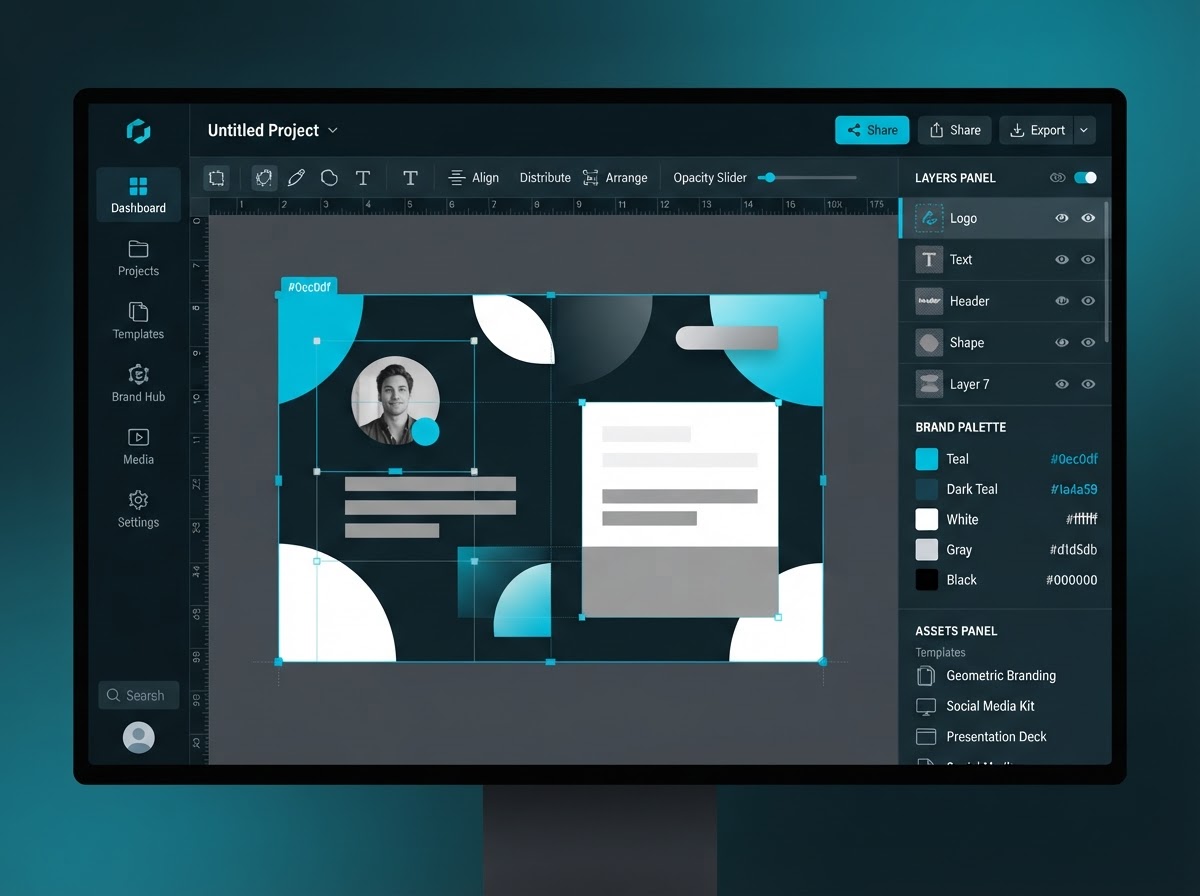
Ready-Made Templates
Start from hundreds of templates sized for social posts, flyers, business cards and more.
Brand Kit
Save your colours, fonts and logo once and apply them across every design in one click.
Drag-and-Drop Editor
Move text, shapes and images on the canvas. No design experience needed.
Stock Library
Pull from a built-in library of photos, icons and graphics without leaving the editor.
AI Design Assist
Generate copy suggestions and layout ideas with the AI tools already in your BOS.
Export Anywhere
Download as PNG, PDF or JPG, or push a finished graphic straight to your social media scheduler.
One less subscription to manage
Canva Pro runs $15 to $30 per user every month. BOS Creator Studio is included with every BOS plan, so you design, store and schedule your graphics from the same system you already run your business on.
Pick a Template
Open BOS Creator Studio from your dashboard and choose a template or a blank canvas.
Make It Yours
Drop in your logo, colours and copy. The brand kit keeps everything on style.
Export or Schedule
Download the finished file or send it straight to your BOS social media scheduler.
Reuse Anytime
Every design saves to your BOS media storage, ready to duplicate and edit next time.
As capable as Canva. Included with BOS.
BOS Creator Studio is a BOS exclusive. It is built into the Business Operating System, so your designs, brand assets, media storage and social scheduler all live in one place. No separate subscription, no extra login, no per-user fee.
- ✓Unlimited designs with no per-user pricing
- ✓Brand kit keeps your colours, fonts and logo on hand
- ✓Push finished graphics straight to your social scheduler
- ✓Every design saves to your BOS media storage
BOS Creator Studio
Built into BOS
What you stop paying for
Canva Pro
$15 per user, per month
Replaced by BOS Creator Studio
Adobe Express Premium
$10 to $20 per user, per month
Replaced by BOS Creator Studio
Those prices are published list prices as of October 2026 and do not include the per-user costs that stack up as your crew grows. BOS Creator Studio covers your whole team at one price, inside the BOS.
Built-In Layers
Organize complex designs with layers, just like a pro design tool.
Share & Collaborate
Share a design with your team or hand it to a client for review, all inside BOS.
Right Size Every Time
Templates are pre-sized for Instagram, Facebook, flyers, business cards and more.
No Extra Login
Open Creator Studio from your BOS dashboard. No new account, no new password to remember.
BOS Creator Studio: your design tool, built in
Most service businesses end up paying for a separate design tool on top of everything else. You need social posts, flyers, business cards and the occasional ad, so you add a Canva or Adobe Express subscription and another monthly bill. Then you have to move files between that tool, your social scheduler and your media storage, and nothing stays connected.
BOS Creator Studio is built into the Business Operating System, so you design, store and schedule your graphics from one place. Your brand kit, your templates and your finished files all live next to your CRM, your contacts and your social media scheduler. When a design is done, you can push it straight to a scheduled post without downloading and re-uploading anything.
Because it is included with every BOS plan, there is no per-user fee and no separate login. Your whole crew can open the editor from the same dashboard they already use to run the business. That is one fewer subscription, one fewer password and one fewer place where your brand files get lost.
If you are already paying for a design tool, BOS Creator Studio is designed to replace it. Book a consultation and we will show you how it fits into the rest of your BOS setup.
BOS Creator Studio questions, answered
Is BOS Creator Studio really included, or is it an add-on?
It is included with every BOS subscription. There is no separate fee, no per-user charge and no upgrade required. If you have BOS, you have Creator Studio.
Can it replace Canva for my business?
For the day-to-day graphics a service business needs, yes. Templates, a brand kit, a stock library and a drag-and-drop editor cover social posts, flyers and business cards. If you need advanced print production work, you may still want a specialist tool for that part.
Do my designs connect to the rest of BOS?
Yes. Finished graphics save to your BOS media storage, and you can push a design straight to your BOS social media scheduler. No downloading and re-uploading between tools.
What does it cost?
BOS Creator Studio is part of your BOS subscription. Most clients save more than they spend by cancelling the design tool BOS replaces. See the pricing page for the full breakdown.